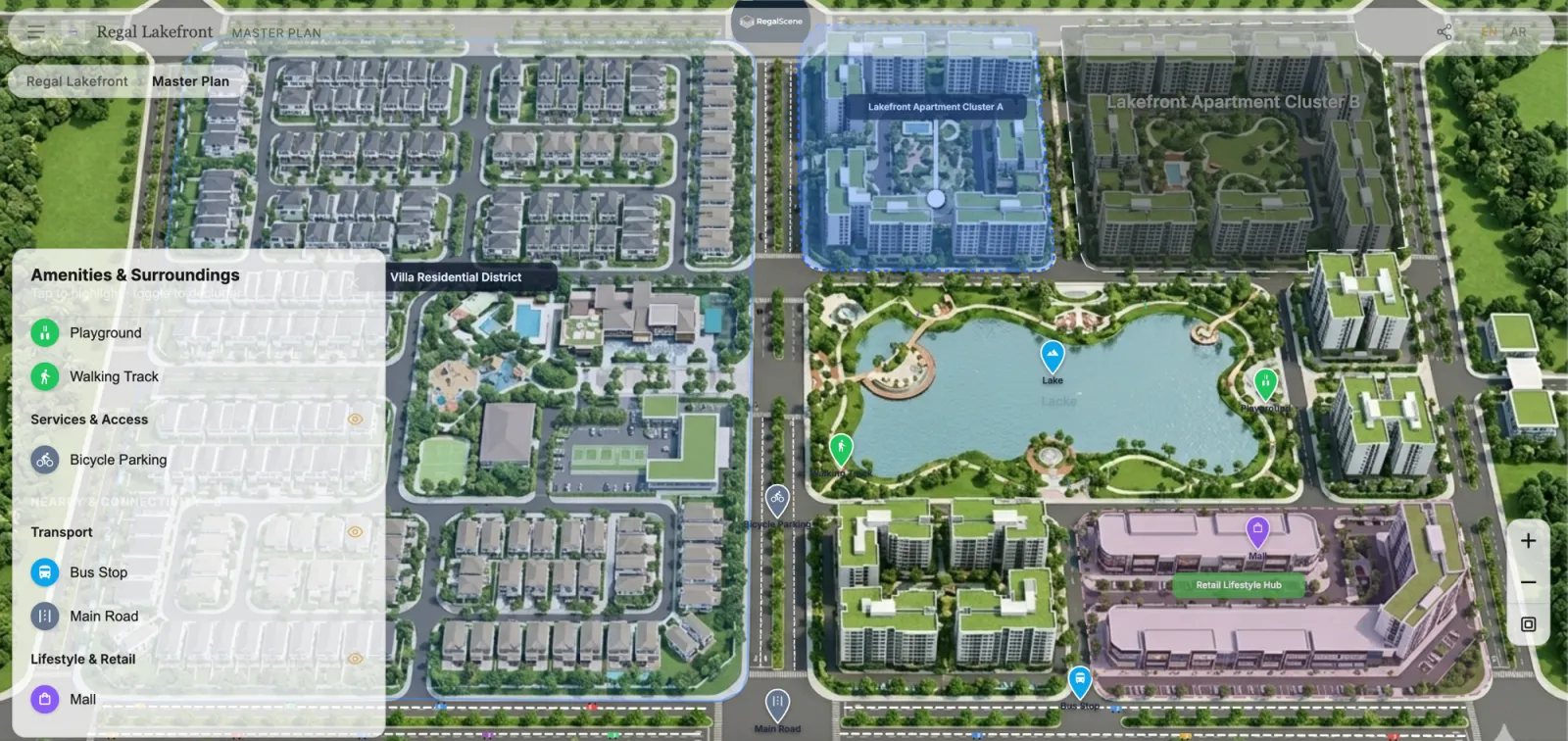
A master plan is the first thing a buyer sees when exploring a new development. It shows the layout — buildings, precincts, amenities, green spaces, retail areas, and infrastructure. But as a static image, it only tells part of the story.
An interactive master plan lets buyers zoom in, click on zones, navigate to buildings, and drill down to individual floors and units — all from the same visual starting point.
What makes a master plan interactive?
Deep-zoom imagery
High-resolution master plan renders are tiled into deep-zoom layers that load instantly at any scale. Buyers can zoom from the full development view down to individual plots without waiting or pixelation.
Clickable zones and hotspots
Each zone, building, or amenity on the plan becomes a clickable hotspot. Clicking on a residential cluster navigates to that building's view. Clicking on an amenity shows details. The master plan becomes a navigation interface, not just an image.
Live availability
Unit status — available, reserved, sold — overlays directly onto the plan. Buyers can see at a glance which areas still have availability, without asking the sales team.
Connected navigation
The master plan connects to the rest of the digital sales experience. From the master plan, buyers navigate to building views, floor plans, and individual unit details in a natural, visual flow.
How it changes the launch experience
Before launch
An interactive master plan can be published before the physical sales gallery is ready. Buyers start exploring the development online, generating interest and early leads before launch day.
During launch
The master plan becomes the centerpiece of the digital launch experience. Marketing campaigns link directly to the interactive plan, and buyers who arrive at the sales gallery have already oriented themselves.
After launch
As units sell, the plan updates in real time. The interactive master plan remains the ongoing digital entry point for the development, long after the initial launch campaign ends.
What developers need to get started
The starting point is what most developers already have: a high-resolution master plan render. This is tiled for deep-zoom viewing, and the team adds hotspots, zone labels, and navigation links through a visual editor.
No 3D models are required. No game engines. No specialized rendering software. The visual assets that already exist in the marketing toolkit become the foundation of the interactive experience.
Related reading:
- Interactive Property Map for Real Estate Developers: The Complete Guide
- 3D Rendering for Real Estate Marketing: Make the Renders You Already Paid For Sell Units
- Interactive Floor Plan Software: What Developers Should Look For
- Digital Sales Gallery vs Physical Sales Gallery
- Digital Property Sales in Southeast Asia
Scene Engine powers interactive master plans with deep-zoom imagery, overlays, and hotspot navigation. Learn more or book a demo.